

Why Your Small Business Website Gets Traffic but No Leads
April 24, 2026
Brand Authority vs Traffic in SEO: What Really Drives Revenue? (2026 Guide)
April 30, 2026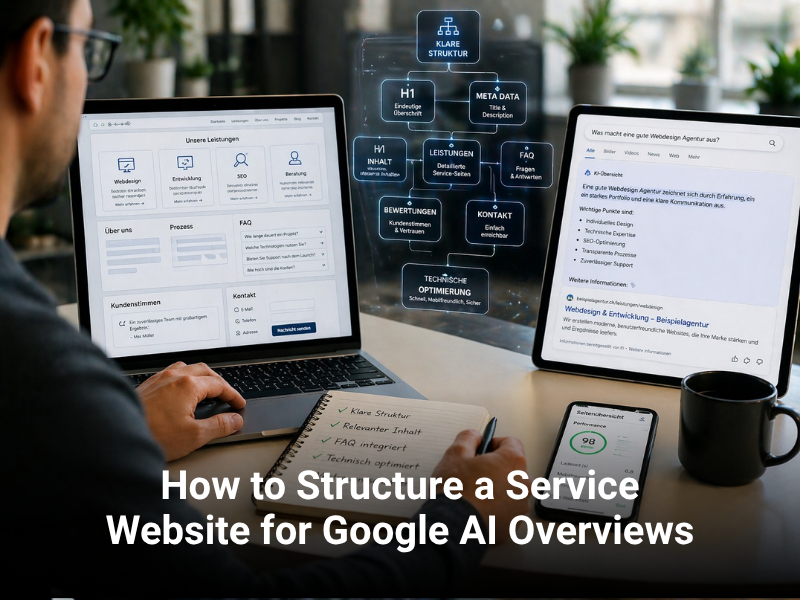

How to Structure a Service Website for Google AI Overviews
What are Google AI Overviews (and why they matter)?
Google AI Overviews are generated summaries that appear above traditional search results. They pull information from multiple sources — ideally including your website — and synthesise them into a coherent answer to the user's question. When your website is cited in the overview, your site receives traffic and credibility, even if the user clicks the overview itself rather than your link.
For service businesses, appearing in AI Overviews is becoming as important as ranking in position 1 for traditional SEO. This requires a different approach to on-page structure and content strategy.
Why most websites don't appear in AI Overviews
Google's AI needs to understand your content clearly and extract relevant information. If your website is poorly structured, uses vague language, or buries key information in walls of text, Google's AI simply cannot pull from you. Most websites fail for these reasons:
- No clear information hierarchy — AI struggles to identify the primary topic
- Walls of prose instead of scannable sections — AI prefers structured information
- No schema markup — machine-readable data helps AI understand context
- Questions are not answered directly — AI looks for direct answers, not buried details
- List and table data is poorly formatted — AI struggles to parse unstructured comparisons
8 essential elements for AI Overview visibility
|
Element |
Why Google AI Needs It |
Implementation |
|
H1 title |
Primary topic signal |
One clear H1 per page, includes target keyword |
|
H2/H3 subheadings |
Semantic hierarchy for topic breakdown |
Organized section structure matching user intent |
|
Schema markup |
Machine-readable structured data |
FAQ, LocalBusiness, HowTo schemas, BreadcrumbList |
|
Direct answers (FAQ) |
AI pulls these verbatim for overviews |
Q&A format, concise answers, clear formatting |
|
Definition sections |
AI summarizes these for concept-heavy topics |
Dedicated 'What is X' sections early in content |
|
Lists & tables |
Easy parsing of comparison data |
Well-formatted bullet points and comparison tables |
|
Meta description |
Snippet preview (affects click-through) |
150 chars, includes keyword, compelling value prop |
Detailed guidance: optimizing your website for AI Overviews
- Start with a crystal-clear H1
Your H1 should be a clear statement of the page topic. Do not be clever or vague. If your page is about 'How to choose a web designer,' your H1 should be exactly that — 'How to Choose a Web Designer' — not 'Selecting Your Digital Partner.' Google's AI learns from the H1 what the page is fundamentally about.
- Use H2 and H3 tags as a semantic outline
Google's AI parses heading structure to understand how your content is organized. Use H2 for major sections and H3 for subsections. Example structure: H2 'How to Choose a Web Designer,' with H3s 'Look for experience,' 'Check portfolio,' 'Verify credentials,' 'Ask about process.' This structure tells Google exactly how you have organized your thinking.
- Answer questions directly in dedicated sections
If your page addresses common questions (and it should), dedicate a section to each question with a clear, concise answer. Ideal format: bold question, then 1–3 sentence direct answer, then expanded explanation. Google's AI will extract the direct answer verbatim — so nail the language in that first sentence.
- Use schema markup to clarify content meaning
Schema markup is machine-readable metadata that tells Google exactly what type of information is on your page. For service websites, use:
- FAQPage schema for Q&A content
- HowTo schema for step-by-step guides
- LocalBusiness schema for service areas, phone, address
- BreadcrumbList schema to show site hierarchy
Best Web Design uses structured data implementation to ensure Google understands your content context.
- Create dedicated definition sections
If your industry has key concepts, create a 'What is X?' section early in your content. Define the term in plain language, expand with context, and provide real-world examples. Google's AI will often pull these definitions verbatim into AI Overviews.
- Use bulleted lists and tables for comparisons
Instead of describing differences in paragraphs, use formatted lists and tables. Google's AI can easily parse: 'Traditional web design takes 12–16 weeks, AI-assisted design takes 4–6 weeks.' Scannable format increases the likelihood of inclusion in an overview.
- Optimise meta descriptions for context
While meta descriptions don't directly impact AI Overview inclusion, they still appear in SERPs and inform the AI context of your page. Keep them 150–160 characters, include your primary keyword, and write a compelling value statement.
- Keep content fresh and authoritative
Google's AI prefers recent, authoritative content. If your blog post about SEO trends is from 2021, Google will favour 2024 articles. Update key content annually, cite studies and data, and maintain strong topical authority in your service area.
Real-world example: service business AI Overview optimization
A plumbing service website targeting 'emergency plumbing repair' would structure content as follows:
- H1: 'Emergency Plumbing Repair: What to Expect'
- Section 1 (H2): 'How Much Does Emergency Plumbing Cost?' — direct answer, then expansion
- Section 2 (H2): 'What's Included in an Emergency Repair Call?' — bulleted list of what happens step-by-step
- Section 3 (H2): 'Common Emergency Plumbing Problems' — table or list comparing burst pipes, frozen lines, overflow scenarios
- Section 4 (H2): 'DIY vs Professional Repair' — comparison table
- FAQPage schema markup wrapping Q&A content throughout
This structure makes it trivial for Google's AI to extract answers and include the site in AI Overviews.
The bigger picture: AI Overviews + traditional SEO
Optimizing for AI Overviews is not separate from traditional SEO — it is an evolution of it. A well-structured, clearly organized, authoritative website will rank well in traditional search AND appear in AI Overviews. Best Web Design ensures both outcomes with a unified SEO strategy that addresses:
- Keyword research and audience intent
- Content strategy with AI extractability in mind
- Technical SEO and site speed
- Schema markup and structured data
- Link building and domain authority
Optimize your site for Google AI Overviews
Let Best Web Design audit your website's AI Overview readiness. We'll identify missed opportunities and restructure your content to maximize visibility in Google's AI-powered search results.